
Module · Recipes & menu
Where to find it in the app
- Use it: Stock → Recipes
- Turn it on/off: your business name (top-left) → Settings → Modules → Stock → Recipes & menu
Plan: Solo & Business · Module group: Stock · Navigation:
Stock → Recipes
Rename it to suit your trade. "Recipe" is fully renameable, a kitchen calls them recipes, a café a menu, a manufacturer products, a service business services. Use the Rename control to set your own word (and the unit, e.g. serving). This manual uses "recipe".
1. Overview
Purpose. Record what you make or do and the stock it uses, so you can track consumption and tie production to your shopping list. Each recipe lists its ingredients/components and an optional yield. Recipes can also carry allergen and dietary tags (e.g. nuts, gluten free), both lists are yours to customise in the module's settings.
2. When to use it
- To standardise recipes/menu items across staff.
- To know how much stock a batch or a sale consumes.
3. Required permissions
- View recipes (
recipes.view). - Add / remove recipes (
recipes.manage).
4. Navigation path
Stock → Recipes (the menu label follows your chosen word).
5. What you'll see
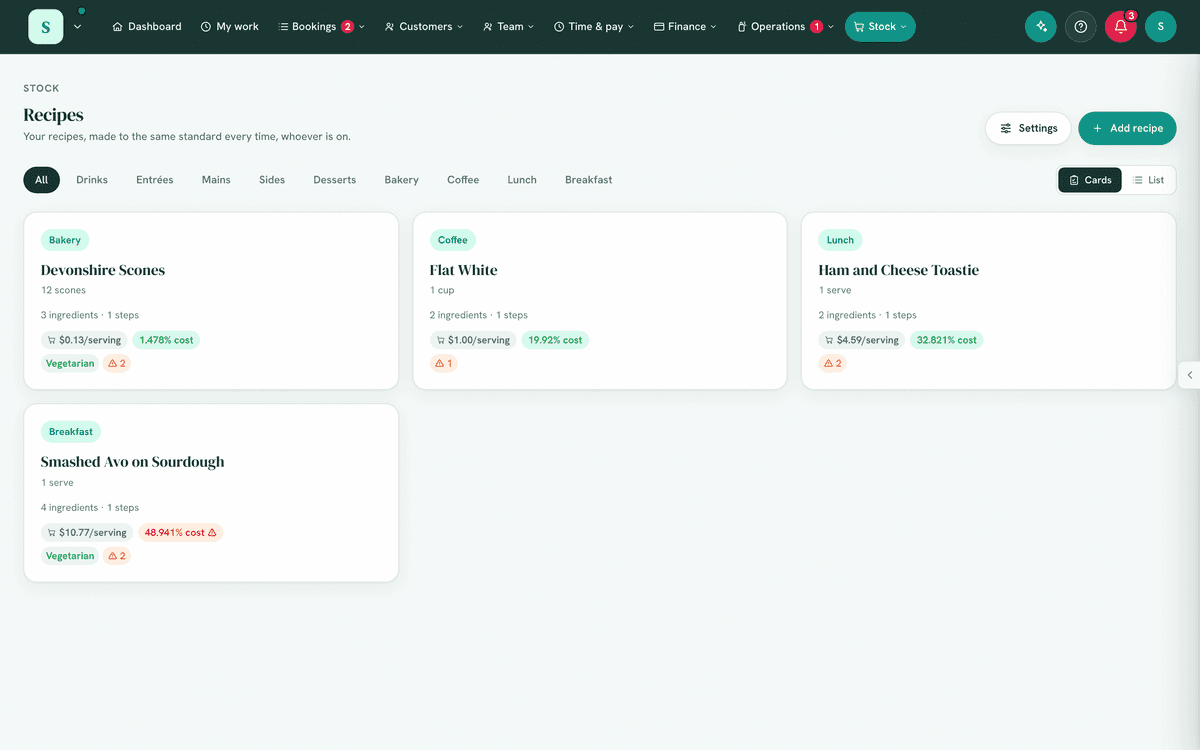
- A list of recipes by category, with a Rename control for your wording.
- Each recipe shows its ingredients (quantity + name), any stock components linked to your stock items, and an optional yield (e.g. "Makes 12").
- Controls to record a batch made or units sold, which can draw down stock.
6. Turning it on
Switch it on in Settings, the Modules tab, under Stock (available on both plans). It pairs with the Shopping list for the stock side.
7. Step-by-step tasks
7a. Add a recipe
- Choose New recipe.
- Set the name, a category, and an optional yield label ("Makes 12").
- Add ingredients, quantity (e.g. 2 cups) and name (Plain flour).
- (Optional) Link stock components to your stock items with a quantity, so making it can deduct stock; set a yield count for accurate per-unit usage.
- (Optional, food businesses only) Tag allergens and dietary suitability. These tags appear only when the module is in food mode, which is on by default for food-type words (recipe, dish, menu item, meal, drink, cocktail) and can be switched on for any word under Rename → Food business. You pick from your own lists, so edit both in the module's settings to match your menu (e.g. add lupin or halal).
- Save.
7b. Record production / sales
- Open a recipe.
- Choose batch (how many you made) or sold (how many sold) and enter the count.
- Record. Every linked item is drawn down in one step, or none is.
Recorded then lists each item and what is now on hand. When an item did not have enough, it says how much was taken of what was needed (took 1 kg of 1.5 kg): stock stops at 0, and the item's history line says how much the recipe needed, so the next count finds the difference. Anything the use takes down to its reorder level joins the shopping list straight away, when Add low stock to the list for me is on. Pressing Record again after a slow connection records the use once. Recording changes stock, so it needs Manage stock & ordering.
7c. Rename for your business
- Choose Rename.
- Set your noun (e.g. service) and unit (e.g. serving). Menus and labels update everywhere.
7d. See cost, margin and how many you can make
When a recipe's components are linked to stock items that carry a cost price, the recipe works out its money and stock maths for you:
- Cost & margin. It shows the cost per recipe and per unit, drawn from the linked stock. Add a sale price and it also shows the profit per unit and the food-cost %. If that percentage goes over your target, the figure turns into a low-margin alert ("over your target"). Set the target under Rename → Food business (the food-cost alert %).
- Registered for GST, it is all ex GST. The GST in your sale price goes to the tax office, and the GST on what you buy is claimed back, so the cost, the profit and the food-cost % are worked out without GST on either side (a GST-free ingredient has none to take off) and say ex GST. The sale price is still typed including GST. A dish at $11.00 including GST that costs $3.00 is 30% food cost.
- How many you can make. A readout says "Enough stock for N" and names the ingredient that limits you, so you know your maximum before you start.
- Make-N scaler. Enter how many you're about to make and the Will use panel lists exactly what it draws from stock, flagging anything you're short of.
- Sub-recipes. A component can be another recipe (a sub-recipe) instead of a stock item. Its ingredients flatten in automatically for costing, stock usage and the max-makeable count.
8. Examples
- Beginner (café): add a Banana bread recipe with its ingredients so every shift makes it the same way.
- Real-world (restaurant): link recipe components to stock; recording a batch deducts flour, sugar and butter from stock levels.
- Advanced (manufacturer): rename to Products with unit unit, link bills of materials to stock, and record production runs to keep stock accurate.
9. Reports & exports
Stock drawn down by production feeds the Shopping list. There's no separate export; the recipe list is the reference.
10. Common mistakes
- Not linking stock components, then recording production won't affect stock.
- Inconsistent units, keep ingredient and stock units aligned.
- Forgetting to set a yield count, needed for accurate per-unit consumption.
11. Troubleshooting
| Problem | Fix |
|---|---|
| Recording a batch doesn't change stock | Link stock components to the recipe and ensure the Shopping/stock module is on. |
| Recorded says took 1 kg of 1.5 kg | There was less in stock than the recipe needed. The item is now at 0 and its history says what was needed; count it to put the figure right. |
| A stock item can't be linked | Only your own stock items can be linked. Pick it from the list. |
| The nav says something other than "Recipes" | That's your renamed word, expected. |
| Can't add or edit | You need Add / remove recipes. |
12. Error messages
Adds, recordings and renames confirm inline. There are no blocking dialogs.
Related: Stock & ordering · Safety & cleaning