Module · Reminders & digests
Where to find it in the app
- Use it: Operations → Reminders
- Turn it on/off: your business name (top-left) → Settings → Modules → Operations → Reminders & daily summary
Plan: Business · Module group: Operations · Navigation:
Operations → Reminders
1. Overview
Purpose. One tidy list of everything due across the business, and one optional email each morning that carries it to the right people: expiring licences, draft invoices ready to send, overdue invoices, quotes awaiting a reply, assets due for service, warranties and contracts expiring, tasks due and overdue, booking balances to collect, and memberships past due. Every type has its own on/off toggle and only shows when its source module is on, so you choose exactly which reminders you want.
The morning email also carries anything waiting on a decision (bookings to approve, team requests, low stock and so on) plus warm notes like a team member's work anniversary, so it is the whole morning in one message. Nothing to report means no email at all.
2. When to use it
- To start each day with a single list of what needs chasing.
- To make sure compliance and money items don't fall through the cracks.
- To put the same list in your managers' inboxes each morning, automatically.
3. Required permissions
- View reminders & digests (
reminders.view), to see the page and to receive the daily email. - Manage reminders & digests (
reminders.manage), to change the settings, snooze items, and send the email by hand.
4. Navigation path
Operations → Reminders
5. What you'll see
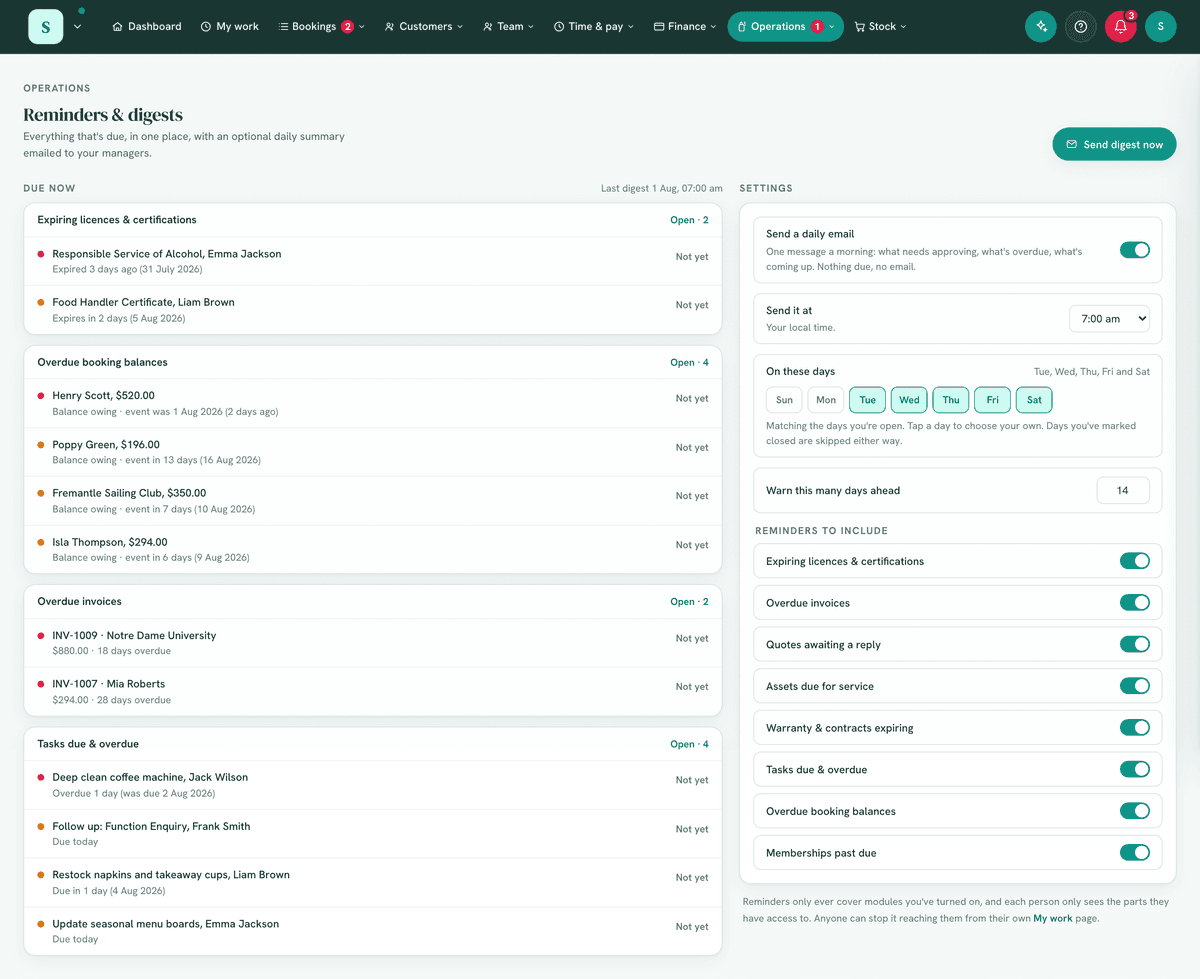
- A Due now panel, the live list of items needing attention, pulled from your other modules, with a New marker on anything that landed this morning. Each person sees only the groups their role can see.
- A Settings panel: the daily email switch, what time and on which days it goes, Who gets it, the weekly wrap, and toggles for each reminder type.
- A Snoozed list when anything is hidden, with a Bring back button.
- Two buttons up top: Email me a preview (one copy, just to you) and Send digest now (today's email, to everyone).
6. Turning it on
Settings → Modules → Operations & compliance → Reminders.
The reminders it can show depend on which related modules you have on (Invoicing,
Licences & certificates, Assets, etc.).
7. Step-by-step tasks
7a. Choose your reminders
- Open
Operations → Reminders. - In Settings, switch on the reminder types you care about. Only the types whose source module is switched on appear here to toggle.
- Set Warn this many days ahead to control how early upcoming expiries and balances appear.
7b. Set when the daily email goes
- Turn on Send a daily email.
- Pick the hour under Send it at, in your own local time.
- Pick the days under On these days. Out of the box it matches the days you're open, so a business shut on Sunday isn't nagged on Sunday; tap days to choose your own instead. Days you've marked closed (public holidays, a Christmas shutdown) are skipped either way.
7c. Check who receives it
The Who gets it line names everyone the email goes to: every active team member whose role has View reminders & digests. Each person's copy only shows what their own role can see, so a manager without invoicing access is never emailed invoice amounts. Anyone can stop it reaching them personally from their own My work page (the email's footer links straight there); the list shows who has done that.
7d. Preview it without emailing everyone
Select Email me a preview. One copy goes to you alone, marked as a preview, and it never counts as the day's real send. Send digest now is the loud version: it sends today's email to everyone on the list, and the morning cron then treats today as already sent.
7e. Work the digest
- Read the Due now list, worst first. Anything wearing a New marker landed on the list this morning (an invoice that fell due yesterday, a licence that just entered your warning window); everything else you have seen before. The email marks the same items and counts them under New since yesterday.
- Select a group's Open link to jump to the module where you action it (renew a cert, chase an invoice, service an asset).
- Not ready to deal with something? Choose Not yet on the item and pick Tomorrow, A week or A month. It disappears from the list and the email until then, and sits in the Snoozed list where Bring back undoes it.
- You can also snooze straight from the email: each line has its own Not yet link (only in the copies sent to people who can manage reminders). The link opens a small page with the same three choices, works for a week without logging in, and everything it hides still shows in the Snoozed list.
7f. Open one morning a week with a wrap
Turn on Open one morning a week with a wrap and pick the morning. That day's email starts with a short Your week: money received over the last 7 days, bookings held, bookings on the books for the week ahead, and what's rostered. It goes out even on a quiet week, that being rather the point, and each line only appears for readers whose role can see that area.
7g. Remind your customers when their equipment is due
Everything above emails your team. This one emails your customers, and it's the email a workshop, pool service or aircon crew lives on: when a customer's own vehicle, pool or unit reaches its service window, the owner gets a branded email saying it's due, with a Book a time button (when Bookings is on) and your own optional line.
- Give the equipment an Owner and a service schedule in Equipment & maintenance, it's the same interval and last-serviced date the register already uses.
- On this page, under Remind your customers, turn on Email owners when their equipment is due. It's off until you switch it on.
- Pick how many days before the due date the email goes, the send time, and (optionally) a line of your own, e.g. a booking incentive.
- Who gets it shows live how many owners are inside the window right now, resolved exactly the way the morning send resolves it.
- Email me a sample sends one copy to your own inbox so you can read every word before any customer does.
How it behaves:
- One email per customer per morning, covering everything of theirs that's due, and one email per service cycle: once it's sent, nothing more goes for that item until a service is logged and the next due date approaches.
- At most 50 customers a morning, most due first; anything held over leads the next day's batch.
- Every email says why the person is getting it and carries a working Stop these reminders link (Australian Spam Act practice). A stop is honoured forever, and it's separate from marketing consent, so stopping service reminders doesn't cancel a newsletter they wanted, or the other way round.
- Customer equipment due is a separate switch here, off until you turn it on. Your own Assets due for service and Warranty & contracts expiring never include customers' equipment. When it is on, your morning email and the Due now list carry one summary line, "14 customer items due for service, 11 owners have been emailed", linking to the Customer tab of the register. The only names listed are owners who could not be emailed (no address, or they stopped reminders), so you know who to ring.
- Every item in the email carries No longer have this? Let us know. One click records it against that piece of equipment, stops its reminders, and the register and the customer's page show Owner says they no longer have this so you can archive it, reassign it, or keep it as theirs if they clicked by mistake. Nothing is deleted by the click, and their other equipment is unaffected.
- Owners who have opted out, been archived or deleted, or whose address has bounced are skipped automatically. Retired or lost equipment never reminds.
- Equipment more than a week past due is left to your own digest to chase, a customer email about something months overdue usually means it was serviced elsewhere, and reads like you don't know your own records.
8. Examples
- Beginner: turn on just overdue invoices and licences & certificates expiring.
- Real-world (venue): include assets due for service so play equipment is serviced before the weekend, and let the sending days follow your opening days.
- Advanced: enable every reminder type, then snooze the long-running items you're already across so the email only ever says something new.
9. Reports & exports
The digest is the report. Its items mirror what also appears on the dashboard and in Business health; this module gathers them into one place (and a daily email).
10. Common mistakes
- Expecting reminders for a module that's off, the relevant module must be on to feed the digest (e.g. no Assets module → no service reminders).
- Turning everything off, then the digest is empty; enable the types you want chased.
- Reading "Booking balances to collect" as overdue. That group deliberately includes balances for upcoming events inside your warning window as well as late ones; each line says which it is.
- An invoice overdue the day after it was sent. Its customer has shorter terms than your default, set on the customer under Address and billing, and those win. The line says so: 1 day overdue · due on receipt, or net 3 days. Invoices on your usual terms or longer show only the days.
11. Troubleshooting
| Problem | Fix |
|---|---|
| A reminder type is missing | Its source module is off, enable it (e.g. Licences & certificates for cert expiries). |
| The digest is empty | Either nothing is due (good!) or all reminder types are switched off in Settings. |
| Can't see Reminders | You need View reminders & digests, and the module on. |
| The email arrives at an odd hour | Set Send it at on this page (or in Settings → General); it sends in your business's own timezone. |
| Someone isn't getting the email | Check Who gets it: their role needs View reminders & digests, and they may have muted it from their own My work page. |
| An item vanished from the list | Look in Snoozed on this page; Bring back returns it immediately. Snoozing works from the page and from the email's own Not yet links, and both land in the same list. |
| No email arrived today | Nothing was due (no email is sent when there's nothing to say), today isn't one of your sending days, or you've marked today closed. |
| A Not yet link from an old email says it isn't valid | Emailed snooze links last a week. Use a fresher email, or the reminders page itself. |
| Quotes with no valid-until date never came up | They do now: a quote sent longer ago than your warn-ahead window appears under Quotes awaiting a reply. |
| A customer says they didn't get their service reminder | Check the switch is on under Remind your customers, the equipment has an Owner, a service interval and a last-serviced date, and the customer record has an email. They may also have pressed Stop these reminders, or their address may have bounced (see the customers page's "aren't receiving your emails" panel). |
| Remind your customers says it needs a database update | Migration 456 hasn't been applied yet. Nothing is emailed until it is. |
12. Error messages
Setting changes and sends confirm or explain themselves in a small message at the foot of the screen (for example when email isn't connected yet, or a save was refused). If an expected item is absent with no message, check the source module and your reminder settings.
Related: Licences & certifications · Invoicing · Equipment & maintenance